

Nota Vocoder
Nota Vocoder makes one sound speak with another. The track you put it on is the voice (the modulator): its level in each frequency band opens the same band of the carrier. Drop it on a vocal and you hear a robot voice straight away; pick a pad as the carrier and the pad says the words. Robot voices, vocoded choirs, talk-box leads, whispers.
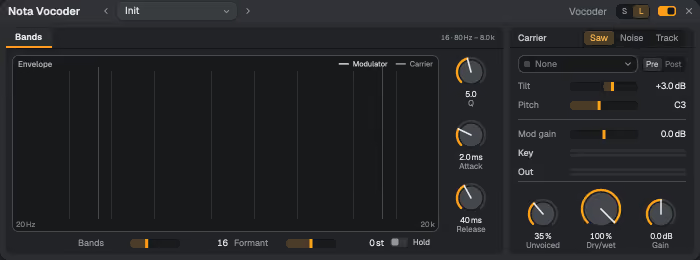
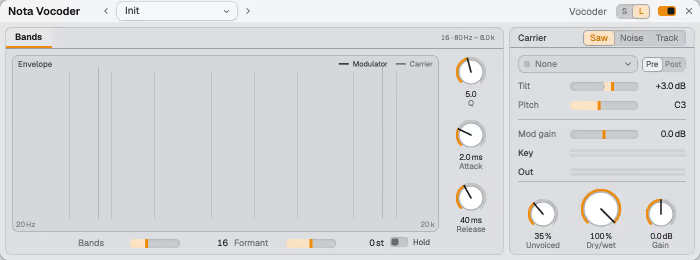
Layout: the envelope graph fills the Bands view (drag its Low and High edges), with Q, Attack and Release beside it and Bands, Formant and Hold under it. The right panel is the Carrier (Saw / Noise / Track in its title bar, the carrier track and its Pre / Post tap, Tilt, Pitch) over the modulator’s Mod gain and the Key and Out meters. Under it sit Unvoiced, Dry/Wet (Mix) and Gain. The S / L switch in the header folds the card to S: the graph over the carrier choice and Bands, Formant, Dry/Wet and Gain.
Modulator
Section titled “Modulator”The modulator is always this track — usually a vocal.
| Control | What it does |
|---|---|
| Gain | Trims the voice before the bands hear it, ±24 dB |
| Key | The voice’s level after Gain |
Carrier
Section titled “Carrier”| Choice | Sound |
|---|---|
| Saw | An internal saw at Pitch (C0–C7, C3 by default) — the default, a robot voice |
| Noise | White noise, for a whisper |
| Track | Another track, picked below — a pad or a synth that speaks the words |
With Saw and Noise the result follows the voice’s level. With Track it sits at that track’s level whatever the voice’s; the voice’s pauses still close the bands.
In an Instrument or Audio Effect Rack chain the Vocoder has no sidechain: use Saw or Noise there (with Track it passes the chain’s sound through unchanged).
| Control | What it does |
|---|---|
| Track picker | The carrier track, with its colour. Every other track and return is offered; this track and the groups it sits in are not (their sound contains the vocoder’s own output). Picking one switches the carrier to Track; None leaves this track playing unchanged until you pick |
| Pre / Post | Where the carrier track is tapped: before its effects and fader, or after both. With Pre, mute the carrier track to hear only the vocoder — it keeps feeding the bands |
| Tilt | Brightens or darkens Saw or Track around 1 kHz before the bands, ±12 dB; a dull pad speaks more clearly with a little more top. Inactive on Noise |
| Pitch | The saw’s note. Active on Saw only |
The graph shows one bar per band — the modulator’s level in it — and a teal line for the carrier’s level in the same bands. The two upright lines are the edges of the band range: drag one to move Low or High, double-click it to reset.
| Control | Range | What it does |
|---|---|---|
| Bands | 8–32 | Fewer is more robotic, more is clearer |
| Low | 20 Hz – 1 kHz | The lowest band’s edge |
| High | 2–20 kHz | The highest band’s edge |
| Q | 1–10 | How narrow each band is |
| Formant | ±12 st | Moves the carrier’s bands against the modulator’s: up sounds smaller, down larger. The pitch stays |
| Attack | 0.5–100 ms | How fast a band opens |
| Release | 5–1000 ms | How fast a band closes; longer is smoother, shorter more articulate |
Output
Section titled “Output”| Control | What it does |
|---|---|
| Unvoiced | Adds high noise where the modulator hisses (s, t, sh), so consonants stay clear |
| Mix | This track as it came in against the vocoded sound |
| Gain | Output level, ±12 dB |
| Hold | Freezes every band where it is; the carrier keeps sounding through it |
The Out meter in the Carrier panel is the output level.
Presets
Section titled “Presets”Seven factory presets: voices (Init, Robot choir, Talk box, Whisper, Lo-fi robot) and pads (Strings choir, Deep giant). Talk box and Strings choir use a carrier track: pick one after loading them. A preset never names a track. In the browser, those two preview by vocoding the demo phrase with itself.
Agents
Section titled “Agents”Over MCP the vocoder is an ordinary audio effect (kind 26). For a carrier track, set its
Carrier param to Track and route the track with set_device_sidechain.