

Nota Strata
Nota Strata is a looper on a track: record a phrase, then keep layering over it. Unlike a one-buffer looper, every pass is its own layer — with its waveform, level and mute — so you can pull a layer out later.
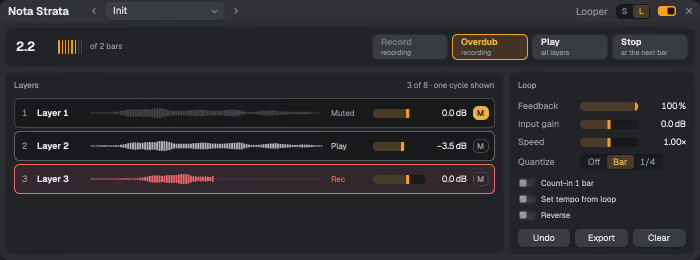
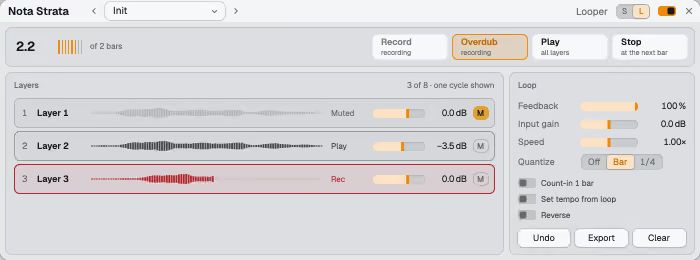
Sizes: the S / L switch in the header folds the card to S: the bar counter and the cycle ticks over the four transport buttons and Feedback, Input and Speed.
Transport
Section titled “Transport”A bar.beat counter, a strip with a tick per beat that fills as the loop runs, and four actions. The strip is there before the first loop too, unlit until the loop closes. Each one is captioned with what it will do if you press it now; one that would do nothing is dimmed.
| Action | Empty | First pass | Loop running |
|---|---|---|---|
| Record | Starts the first pass | Closes the loop and plays it | Records a new layer from the loop’s top |
| Overdub | Starts the first pass | Closes the loop and records layer 2 straight away | Records a new layer from the next quantize step |
| Play | — | Closes the loop and plays it | Plays every layer; from Stop, starts at the top |
| Stop | — | Closes the loop and stops | Stops at the next quantize step and returns to the top |
Quantize sets that step: Off acts at once, Bar on the next bar, 1/4 on the next beat. On the first pass the step is the song’s grid, so the loop comes out a whole number of bars (or beats). A press that is waiting for its step shows waiting… under the action.
Layers
Section titled “Layers”Every pass, listed: its number, name, waveform, state (Play, Muted, Rec), level and mute. Each layer draws in its own shade of grey, the newest brightest; the layer being recorded draws in red and fills as it is recorded; older layers draw dimmer, as Feedback sinks them. Above the list, n of 8 · one cycle shown counts the layers. Drag a level bar to set it, double-click it for 0 dB, or double-click the number to type a value. All eight layers fit in the list.
| Control | What it does |
|---|---|
| Feedback | How much the layers already laid down fade on each pass |
| Input gain | Level of what’s recorded |
| Speed · Reverse | Play the loop faster or slower, or backwards |
| Quantize | The step actions wait for |
| Count-in 1 bar | The first Record counts in one bar (the counter shows the beats left) before it records. Stop cancels the count-in |
| Set tempo from loop | When the first loop closes, the song tempo changes so the loop is a whole number of bars |
| Undo · Export · Clear | Remove the last layer · write the loop as you hear it (every unmuted layer at its level) to a WAV file · start over |
The recorded layers are saved with the project.
Presets
Section titled “Presets”Live Set, Count-In Jam, Ambient Decay, Octave Down, Reverse Tape and Free Overdub.
- Looping a live input: put Strata on an audio track with monitoring on, and record from your interface.
- Map the actions to a foot controller or pads with MIDI Learn.